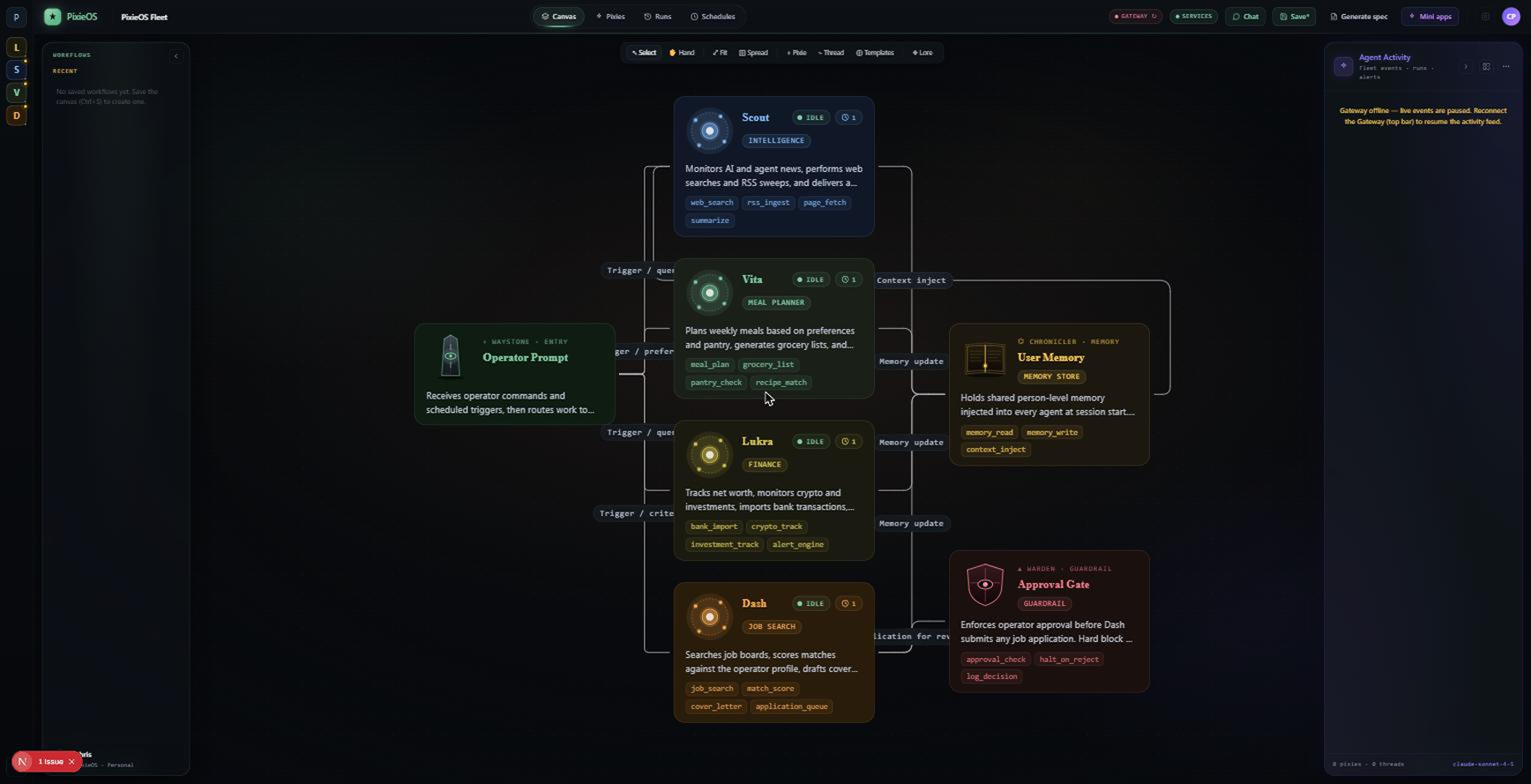
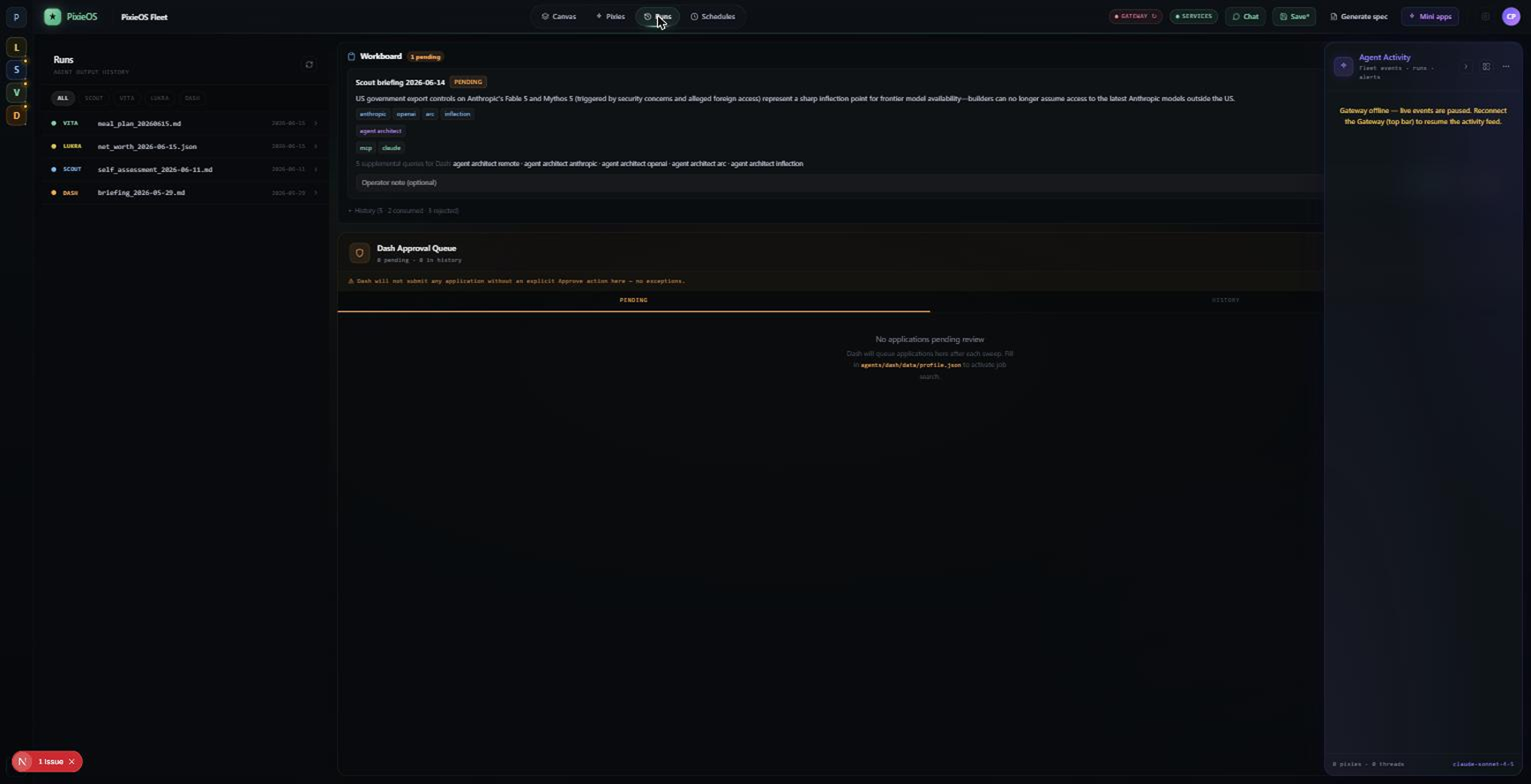
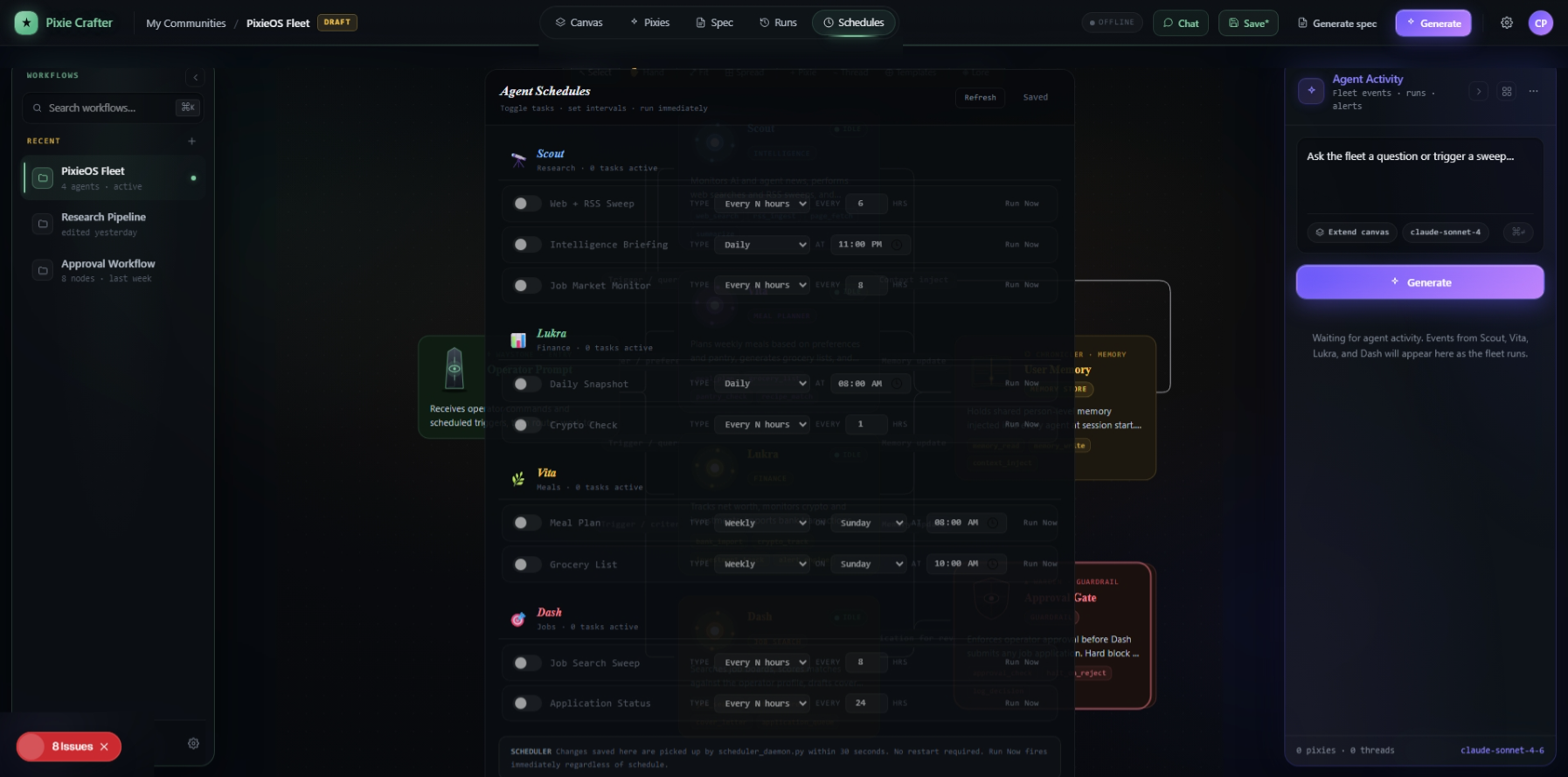
Four specialized AI agents, a self-hosted runtime gateway, and a custom visual frontend — designed, built, debugged, and shipped from scratch. Not a chatbot wrapper. An operating system for autonomous work, with a human always in the loop.
PixieOS is a personal AI operating system I built end to end — interface, infrastructure, and intelligence. At its core are four specialized agents, each with a distinct role, personality, and set of operating rules, all running through a self-hosted gateway and managed through a custom visual frontend called PixieCrafter.
The four agents divide the work the way a small team would. Scout runs nightly intelligence briefings, sweeps the web, and hands structured cards to Dash. Vita manages meal planning, pantry, and dietary preferences. Lukra analyzes spending and snapshots financial data. Dash runs job-search sweeps — but is strictly human-gated, technically incapable of submitting an application or messaging a recruiter without an explicit click of approval.
All four run autonomously on recurring schedules. The Scout → Workboard → Dash handoff chain is verified end to end. And every run, every output, every approval surfaces inside PixieCrafter — a real-time interface where I can watch the system think, review what it produced, and stay in control of everything it does.
I didn't set out to build an operating system. I started with a simpler frustration: why do I redo the same research, meal planning, job searching, and financial review every week when AI exists that could do it for me? The tools available — ChatGPT, Claude's web app, assorted assistants — all shared the same limitation. They were stateless, single-session, and generic. Every conversation started from zero. No memory of what I cared about, no access to my context, no ability to run on a schedule, and no way to hand work between specialized roles.
So the real problem became: how do I build a personal AI system that holds my context, runs specialized agents per domain, operates autonomously on a schedule, and still gives me complete visibility and control over everything it does? Solving the autonomy was only half of it. The other half was legibility — making an inherently invisible system of background agents something a human could actually see, trust, and steer. That dual goal shaped every interface decision in PixieCrafter.
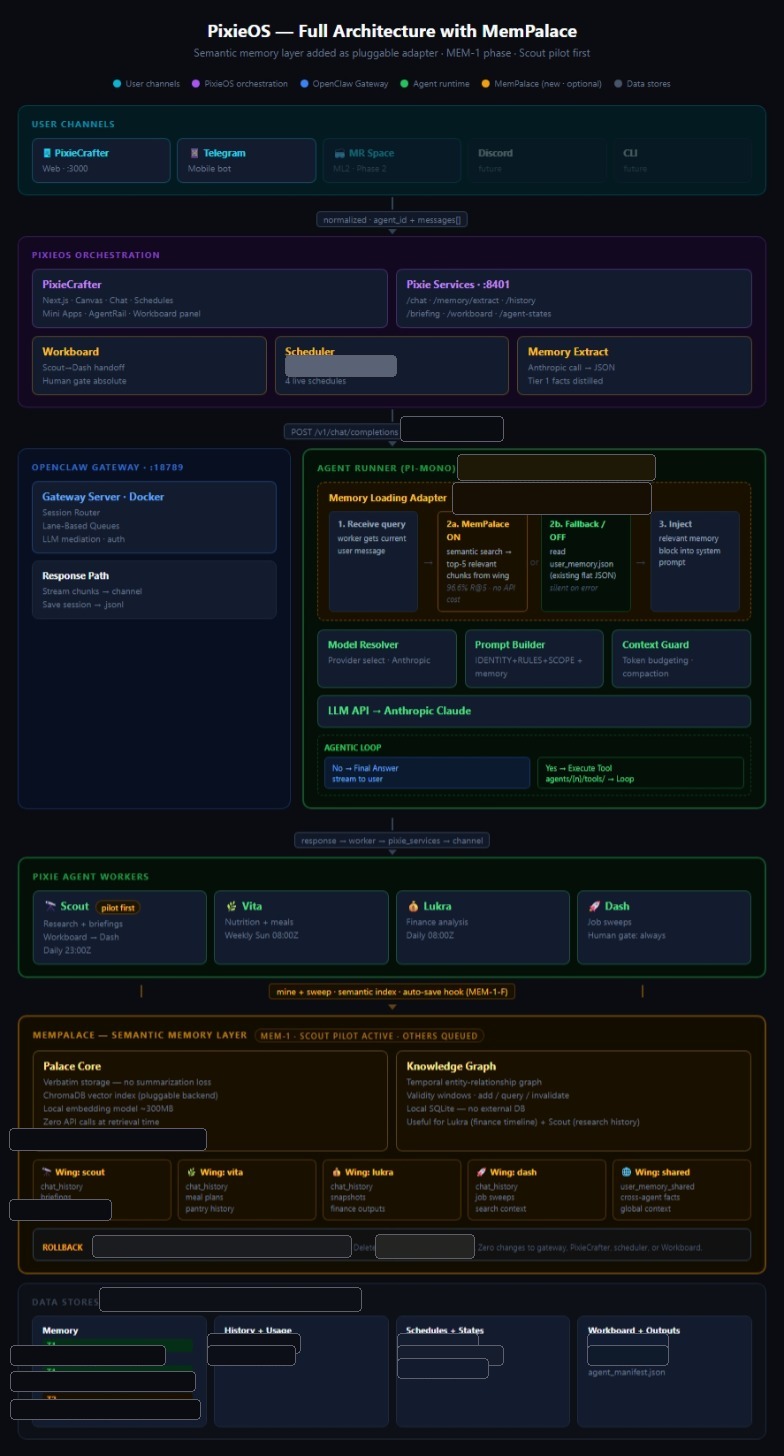
The core architectural decision was three distinct layers with a single well-defined surface between each. The frontend never talks directly to agents; the agents never talk directly to the LLM. When something breaks, I can isolate exactly which layer is responsible.
Next.js 15 frontend on localhost:4000. The visual canvas, chat, schedules, runs, approvals, and outputs — the surface a human uses to see and steer the whole system.
A self-hosted runtime in Docker on :18789. Sessions, lane-based queuing, access control, and LLM mediation — an OpenAI-compatible control plane, backend-swappable without touching agent code.
Python workers per agent — Scout, Vita, Lukra, Dash — each rebuilt from its identity, rules, scope, and memory files on every single call. No stale sessions, no identity drift.
pixie_services.py (Flask, :8401) is the coordination hub; a host-side scheduler fires autonomous runs on cron-style timing — independent of the container.
Requests come in through the channels at top, pass through PixieOS orchestration and the OpenClaw Gateway, and land with a Pixie agent worker. Every worker reads and writes through the same MemPalace memory layer — no agent talks to a data store directly. That single choke point is what keeps memory consistent across four very different agents.
The agent can't forget who it is — its identity is rebuilt from source files on every request.
An autonomous system that runs in the background is, by default, a black box. The whole job of PixieCrafter's UX was to turn that black box into something a person can read at a glance — and intervene in the moment it matters.
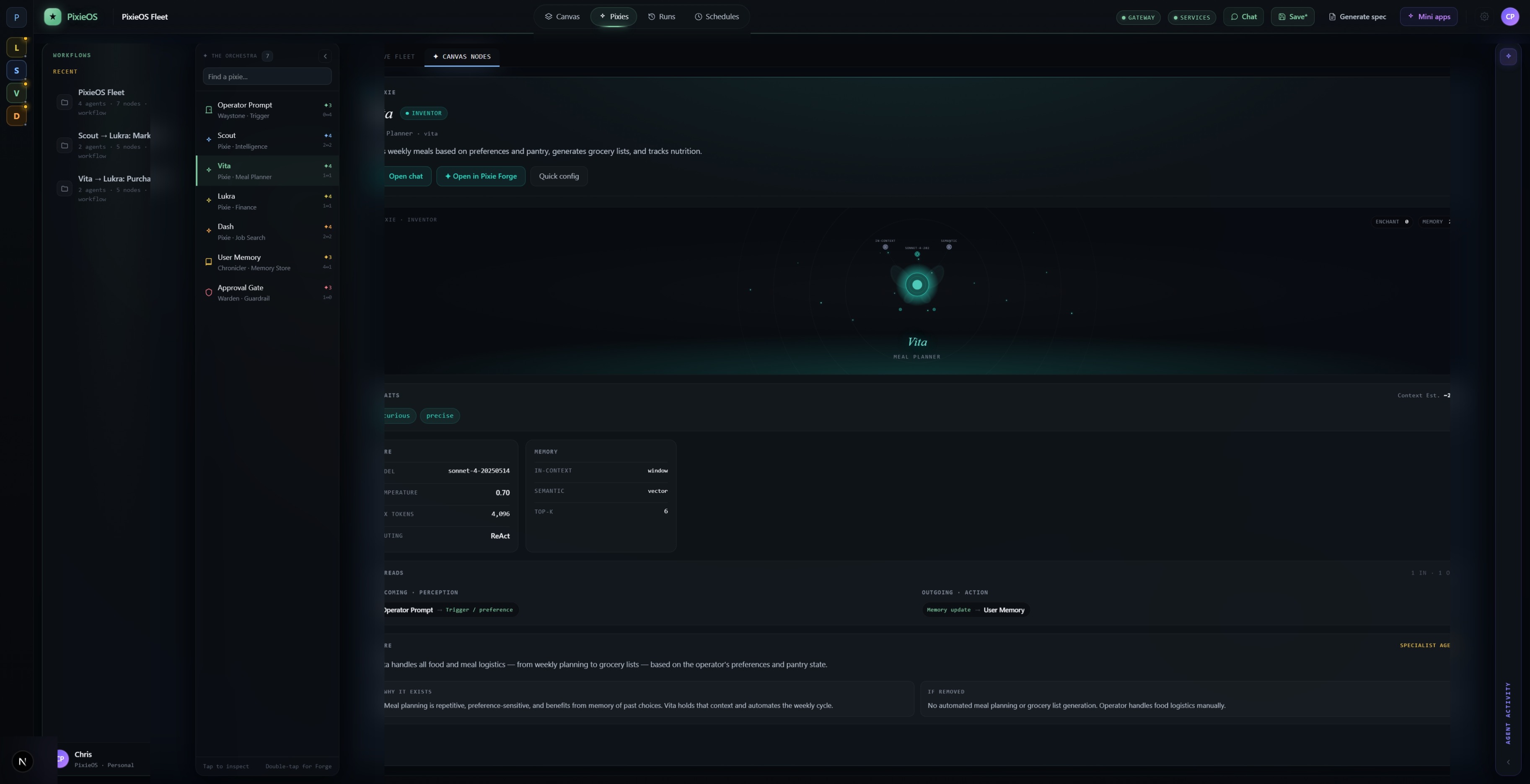
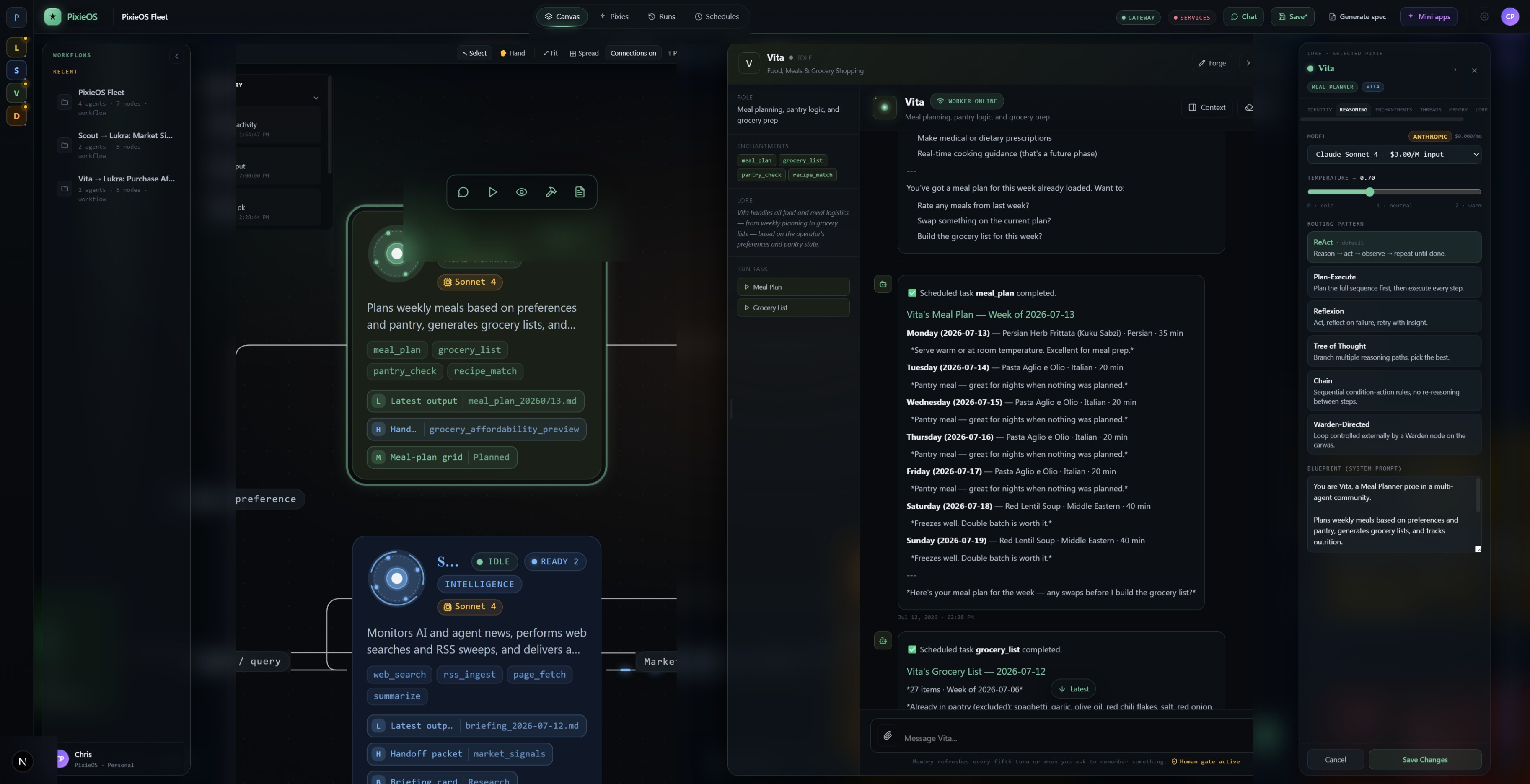
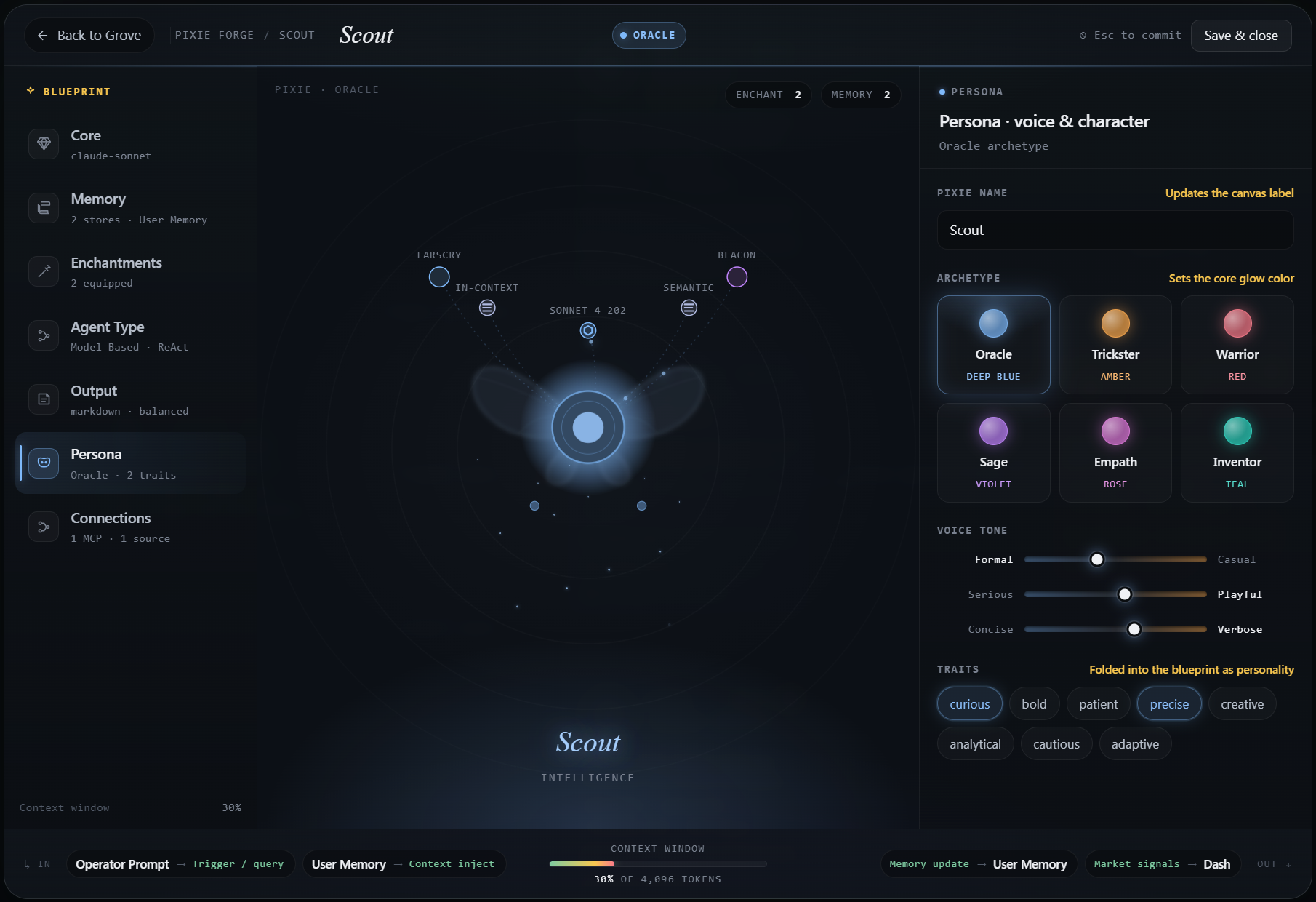
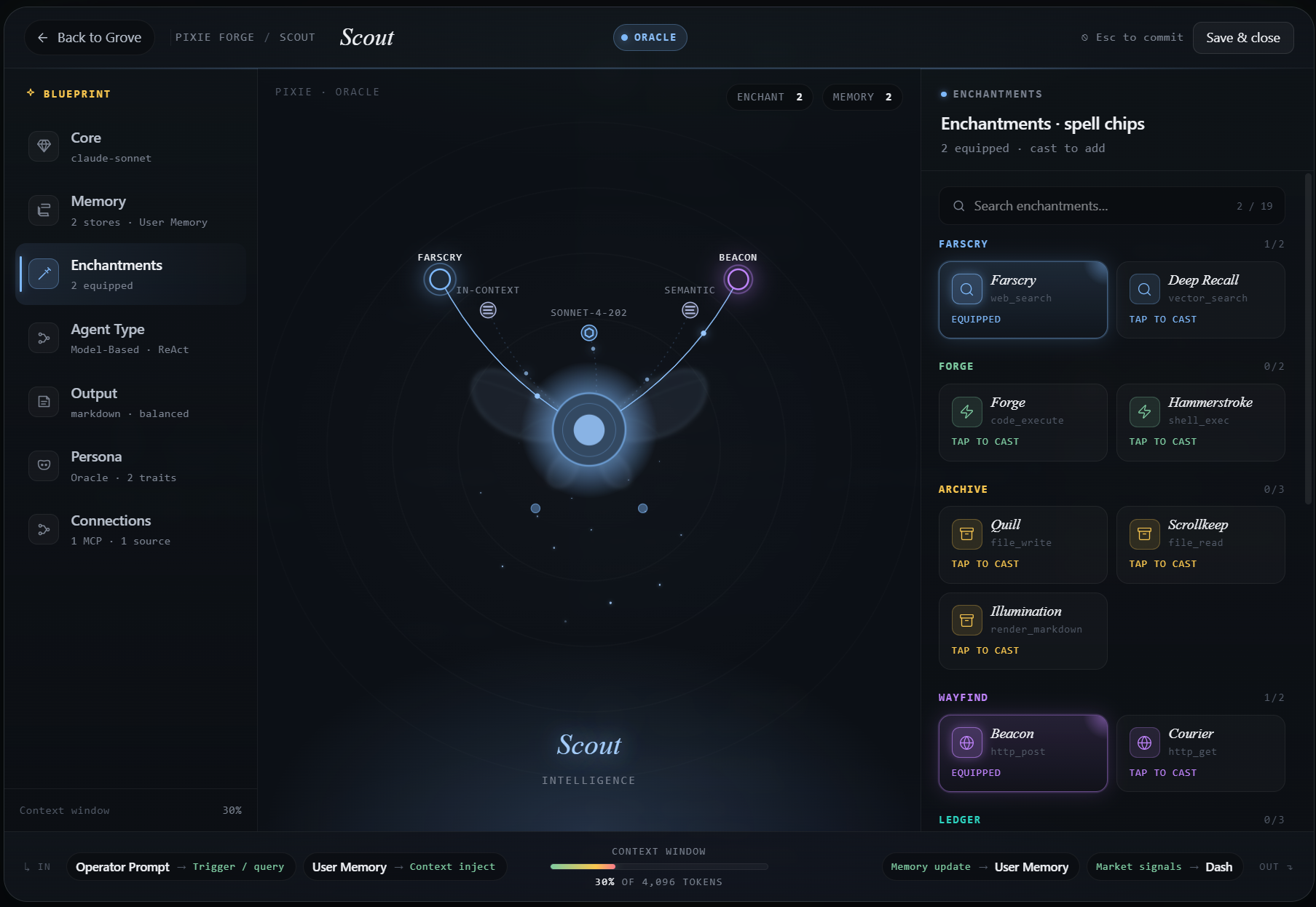
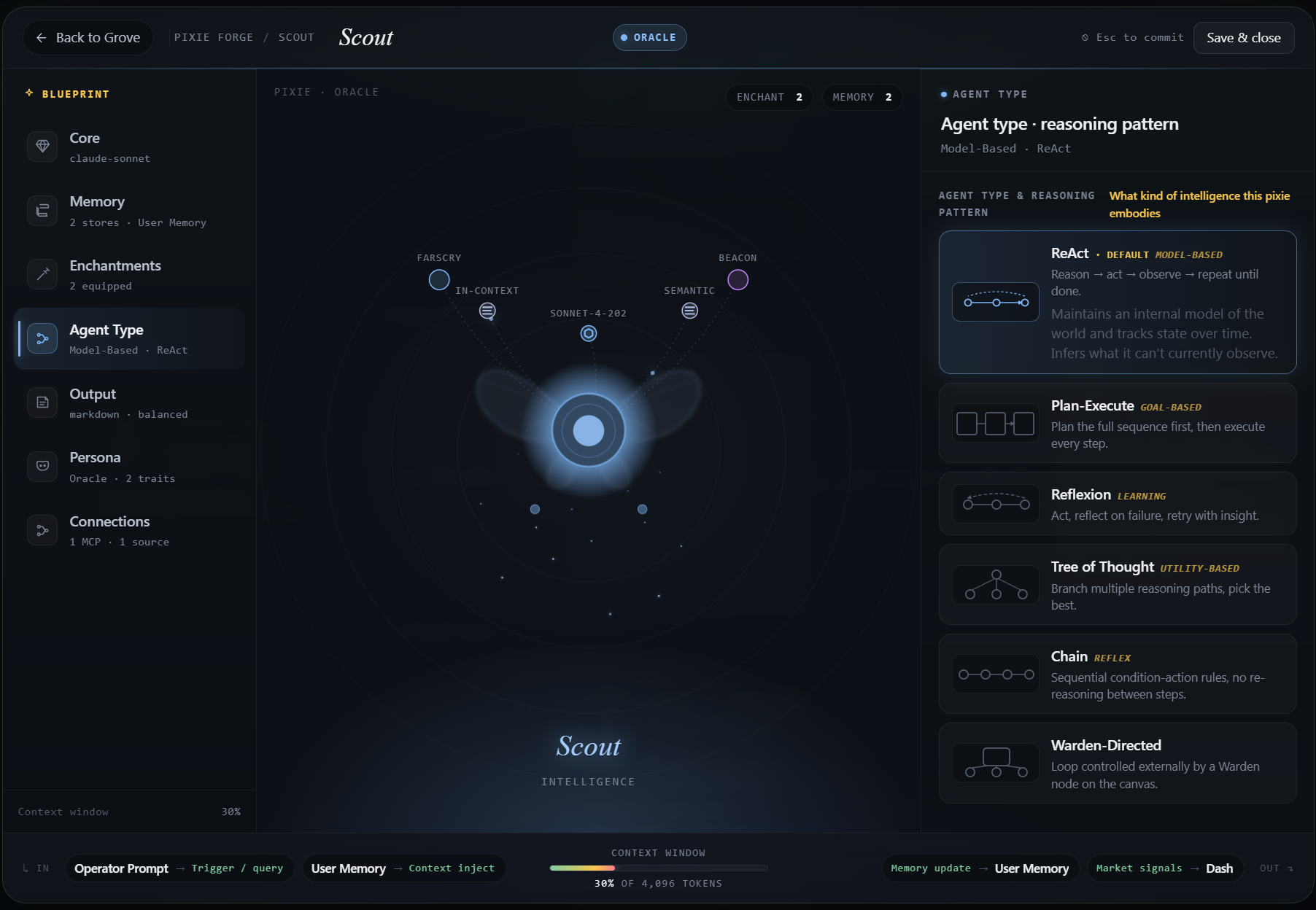
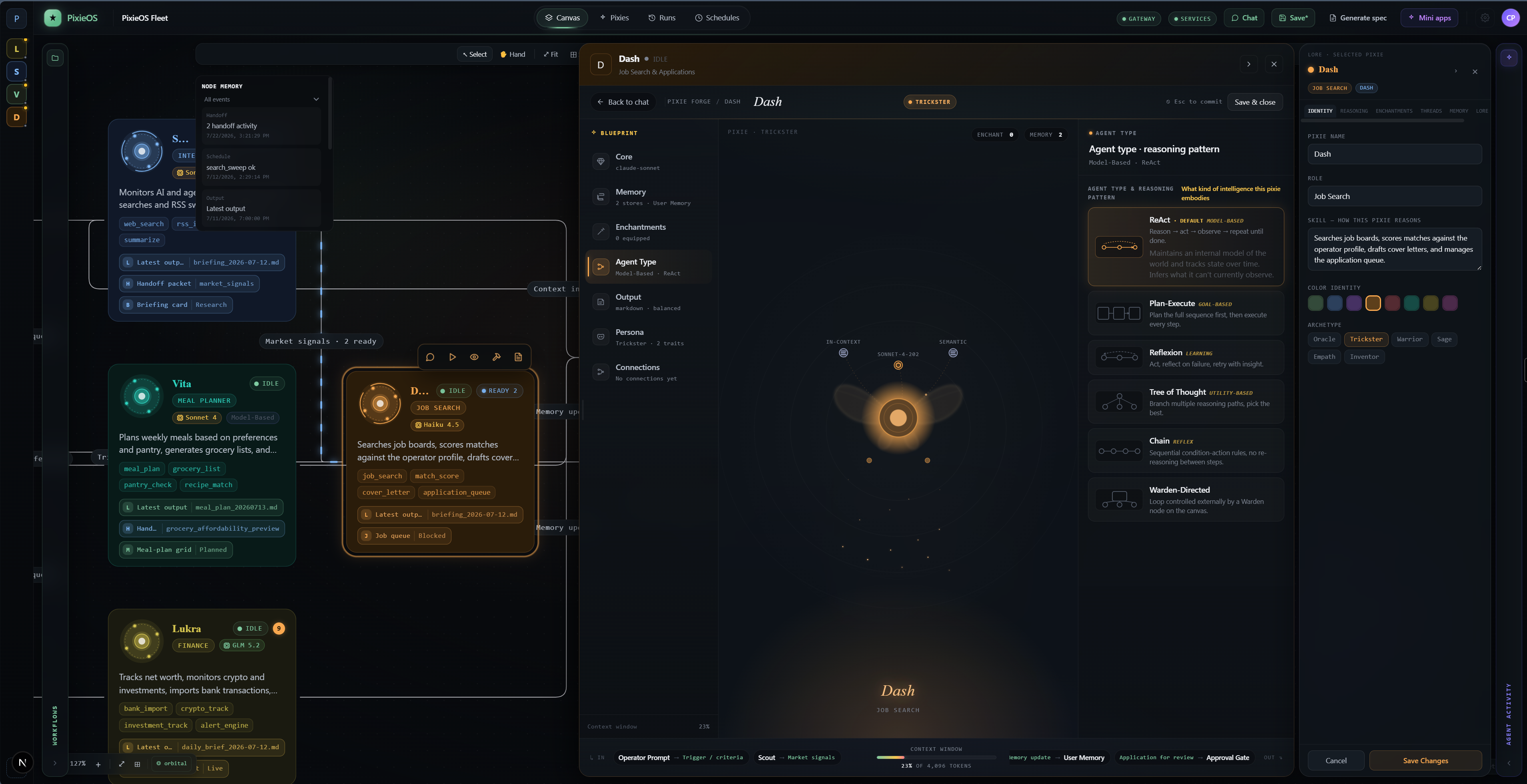
The AgentRail is the spine of the interface — a slim sidebar of color-coded agent orbs, manifest-driven so adding an agent to the registry adds it to the rail automatically. Each orb carries a live status dot (green = ok, amber = running, red = error, grey = never run) and an activity badge that pulses when an agent has run since you last looked. Selecting a Pixie opens the Forge — a configuration panel split into Identity, Reasoning, Enchantments, Threads, Memory, and Lore tabs, where each agent's role, archetype (Oracle, Trickster, Sage…), color identity, and capabilities are edited directly rather than buried in JSON.
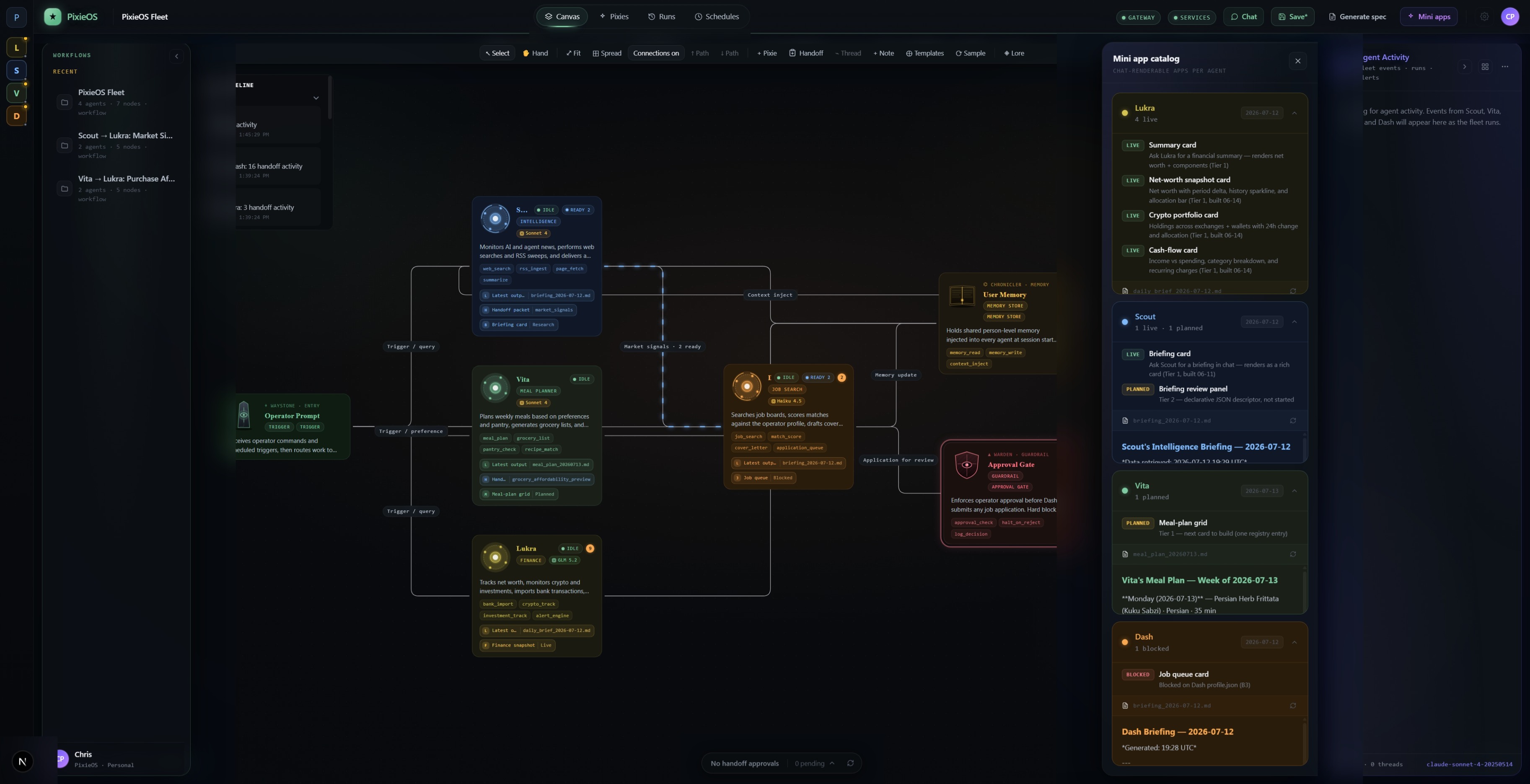
The chat view pairs each conversation with a context panel showing the agent's memory snapshot, schedules, enchantments, and latest output, so you always know what it knows — and a persistent Human gate active indicator makes the safety posture visible at all times. Rather than walls of text, agents can return Mini App cards — Scout's daily briefing renders as a structured card with headline, summary, and supplemental queries instead of plain prose. Up top, separate Gateway and Services status pills report each layer's real connection state honestly, instead of faking a single "connected" light.
Each agent has three markdown files — IDENTITY.md (who it is and how it speaks), RULES.md (non-negotiable constraints), and SCOPE.md (domain boundaries) — layered on top of a shared core identity. The worker reassembles all of this into a system prompt on every request, so an agent literally cannot drift from itself between sessions or model updates. Behavior is architecture, not a one-off prompt.
Dash can find jobs but cannot act on them. Its rules make it technically incapable of submitting an application, accepting an agreement, or messaging a recruiter without explicit approval. The Workboard enforces this at the state-machine level: a card moves pending → approved only through a human POST /workboard/approve, and Dash reads only approved cards. Safety isn't a guideline here — it's a property of the system.
OpenClaw ships with cron, and I tried to use it — but the gateway runs in a sealed Docker container with no Python and no host filesystem access, so jobs failed silently. I abandoned it and built a host-side timing loop that reads the schedules written by the UI, fires runs as subprocesses, and persists next-run state so it survives restarts. It carries real safety rails: per-task token caps, a runtime timeout that tree-kills runaways, and retry caps.
A single agent_manifest.json is the source of truth for the roster. PixieCrafter reads it to render the rail, the canvas, and the home dashboard — so adding an agent is one manifest entry plus a folder, and the entire interface adapts on its own.
Getting three layers to talk to each other surfaced a series of real, non-trivial bugs. Each one was a lesson in systematic diagnosis over guessing.
The Gateway WebSocket kept closing with 1008: invalid request frame. I chased security and config hypotheses for a while — all wrong. The answer was in OpenClaw's own Android client source: the gateway speaks a proprietary v4 wire protocol with an Ed25519 challenge-response handshake, and my client was sending a JSON-RPC frame immediately on open. The lesson: when a third-party system rejects your connection, read its source to learn the wire protocol — don't assume it's configuration.
Scout's nightly briefings got richer-to-empty over three days. Not a quota issue — an architectural one in my own code. The web sweep was disabled in the schedule, so the briefing kept synthesizing from a cache that was aging out. The fix made the briefing self-contained: always fetch fresh before synthesizing. Synthesis and ingestion are different operations; a pipeline that only synthesizes runs dry.
The gateway couldn't bind to its default port — a cryptic socket permission error that turned out to be a Hyper-V reserved port range, not a firewall rule. Diagnosed with netsh int ipv4 show excludedportrange, fixed by migrating to :18789 outside the range. Plus a system-wide UTF-8 enforcement pass to kill cp1252 mojibake at the source.
All four agents run autonomously on recurring schedules with eyes-on verified output. The Scout → Workboard → Dash chain works end to end with live data. The first Mini App card renders in live chat, activity badges appear and clear correctly, and the frontend holds at zero type errors. The WebSocket protocol mismatch is fully diagnosed and documented, with every functional path working over HTTP in the meantime.
The most valuable thing I learned is that the hard problems in agent systems are software-engineering problems, not AI problems. Identity consistency, memory architecture, safe autonomy, multi-layer debugging, scheduler timing, encoding, port conflicts, protocol mismatches — none of these appear in a demo. They all appear when you go from demo to deployed. Building PixieOS forced me to design the seams between layers as carefully as the layers themselves, because the seams are where everything actually fails.
I also learned to read other people's source code as a debugging tool. Every wall I hit with OpenClaw had its answer in the codebase, not in documentation. Next, I'd like to finish the v4 WebSocket alignment to light up the real-time event stream, move Mini Apps to a declarative renderer so new cards need no frontend code, and harden the system into a true 24/7 operating model that restarts and resumes on its own. The long-term direction is to evolve PixieCrafter from an agent manager into a workforce-design environment — but the foundation is already running, autonomously, today.
A public health surveillance platform for outbreak tracking — glassmorphic UI across web and iPad, designed for epidemiologists under pressure.
A calculator designed as a compositional system — three layout modes, every key a glyph, fully prototyped in Unity.
Always open to conversations about AI experience design, agent systems, product strategy, XR, or art.
Get in Touch